 BukaDesk

How It Works
Security
Features
Docs
Download


Protected Route - Security
BukaDesk is designed for private-network access, authenticated sessions, and explicit control permissions.
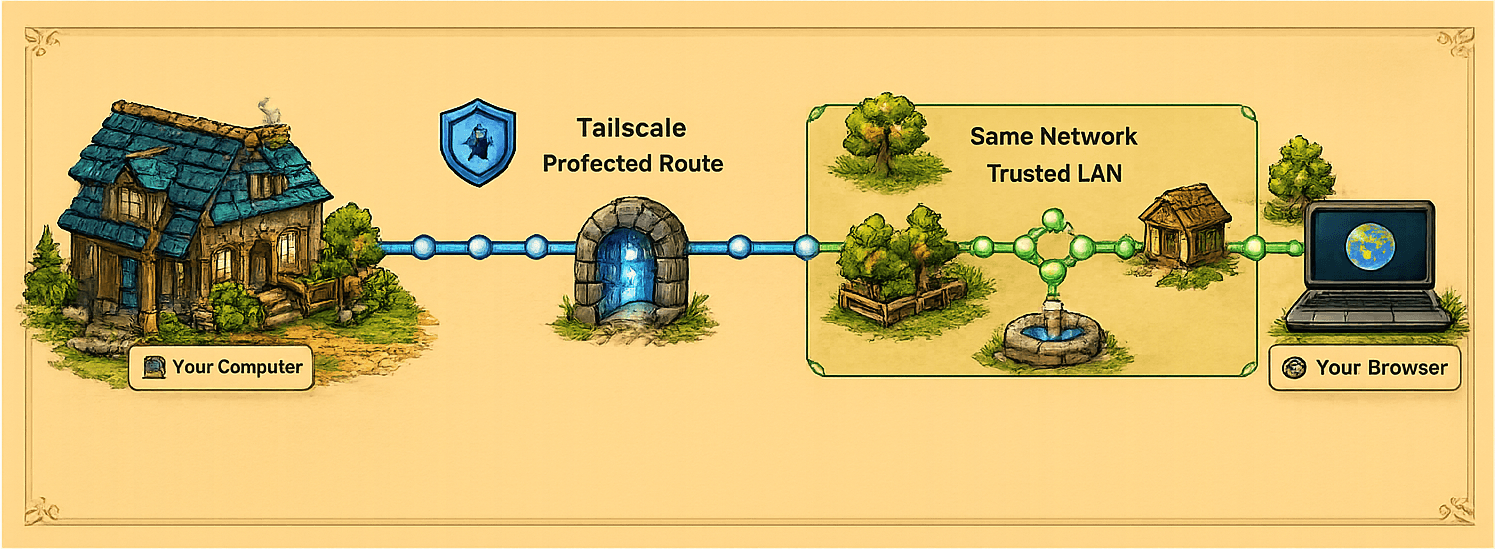
Private Network First
Use Tailscale, or use Same Network only on a local network you trust.
Protected Sessions
Screen viewing, remote input, file transfer, and live connections require a valid access token.
Control Requires Approval
View-only devices request control, and the Admin can allow or deny the request.
No Silent Takeover
Only one device controls the computer at a time, and control changes are explicit.
Guarded Actions
File uploads and remote input are validated, and unsafe or excessive actions are rejected.




Private. Fast. Yours.
Your Desktop,
Wherever You Roam
Access and control your computer from another browser — privately, wherever you are. BukaDesk v0.1.0 Free Public Beta is available for Apple Silicon (arm64) Macs.
No cloud desktop. Direct connection to your computer.
Private remote desktop
No cloud relay. Direct connection to your computer.
Tailscale or local network
Fast, private access on the network you trust.
Browser-based control
Keyboard, mouse, files, and audio from one tab.
Desktop first
Built for desktop computers with privacy in mind.
How BukaDesk works
Connect directly to your computer from a browser over Tailscale or your local network.
Private by design
Your remote desktop stays on the network you control.
BukaDesk documentation
Setup guides and reference material will be available here.
Download BukaDesk
BukaDesk v0.1.0 Free Public Beta is available for Apple Silicon (arm64) Macs.
Simple pricing
Pro subscriptions are not yet available to purchase. Pricing has not been announced.